Saturday, June 27, 2015

Estimating Projects the traditional way and running them using “Agile” methodology

Estimating project is not easy if you don’t have a right approach. You can be in MS Project land trying to figure out little details, but those details change and then you are stuck maintaining schedules in MS Project.
A lot of companies are trying to change to use “Agile” methodology and I am putting the word Agile in quotes because there is no company out there that is following exactly what you are taught in ScrumMaster courses and SAFe courses. That means that companies sooner or later end up doing what works for them and that could be an approach that belongs somewhere on the line between Waterfall and Agile; for some companies closer to Agile and for companies closer to Waterfall.
For example a lot of companies get a list of projects that need to be estimated, prioritized and approved by a board before projects can be worked on. Then when they are approved, you are asked to provide project schedules with milestones and deadlines with very high-level requirements. Then some of these organizations say “let’s run these projects using agile methodologies”. What does that really mean?
What does that really mean if you have already broken down the project into a list of tasks and you estimated it all?
Can the agile team take these requirements and start assigning points to user stories and deciding how much to handle in a given week? In the meantime based on estimates, you already know how much needs to be handled in order to even have a chance to deliver the project?
Is that really fooling the members of the team believing that they will set the velocity based on how much the team can handle and in the meantime the estimates have been already committed?
Let me explain how I approach this. Let me first step back to the point when the estimates are being provided. What works for for me is reading the requirements document and breaking down the project into a list of features and sub-features. Then if the requirements document is written in such a way that it lists the user stories, you can easily distribute these user stories into the appropriate sub-features. If the requirements document does not explicitly list the user stories, then I would put a product owner hat on and extrapolate the user stories out of the requirements document.
Now that I have all the user stories under each sub-feature, I can do some high-level estimating on each story and the unit for estimation is the number of days. It is not some virtual story points and it is not hours; it is the number of day and you will see why later in this article.
After estimating each user story under each sub-feature, you can add up the estimates and have the list of sub-features and numbers for each sub-feature.
Now that you have the list of sub-features and estimate for each sub-feature, it is all fun after this point. It is fun because I like using Trello website to pre-plan all the sprints and ultimately produce the deadline (production launch date), because that’s what business expects from us. NOTE: I don’t do sprint planning at the user story level; I do this exercise of sprint pre-planning at the sub-feature level in order to produce that deadline and to have a rough idea how each sub-feature needs to be worked on throughout the project.
What are the steps to be taken before playing the drag-and-drop game in Trello?
  • Decide on the duration of the sprint (let’s say 4 weeks)
  • Take the list of sub-features and estimates and break down each sub-feature into multiple sub-feature parts that are each 5 days worth of work. For example, if you have a sub-feature that has the estimate of 20 days, then you would break that sub-feature into Sub-Feature A part 1, Sub-Feature A part 2, Sub-Feature A part 3, and Sub-Feature part 4.
  • Now you are ready plug this all into Trello backlog list and then the game of dragging and dropping starts :)
Here is how it could look like in the backlog list when you start:


Now that you have all the sub-feature parts in the backlog, it is time to gauge what the optimal number of resources is. Let’s do some simple math.
  • 6 resources
  • 4 week sprints (20 working days)
  • if everybody is a robot, then the team should be able to chunk away 120 days (6x20) out of the estimates. Yeah right !!! With all the meetings and interactions between teammates, a reasonable number to achieve in each sprint would be 60–80 days worth of work. If each part of the given sub-feature is equivalent to 5 days worth of work from the estimates, then you should be able to drag and drop 10+ of those parts into a given user sprint.
You as the technical lead and technical project manager know best how each sub-feature is related to each other and you are deciding those things as you are loading each sprint with the list of sub-feature parts.
Here is how it may look after going through this exercise. It looks like the duration of the project would be around 14 weeks (3.5 months). If you know what the start date is, then you can easily calculate the production launch date. You also know when you need to start each sub-feature and when each sub-feature is supposed to be completed. That can help you point out some major milestones to your senior management team.
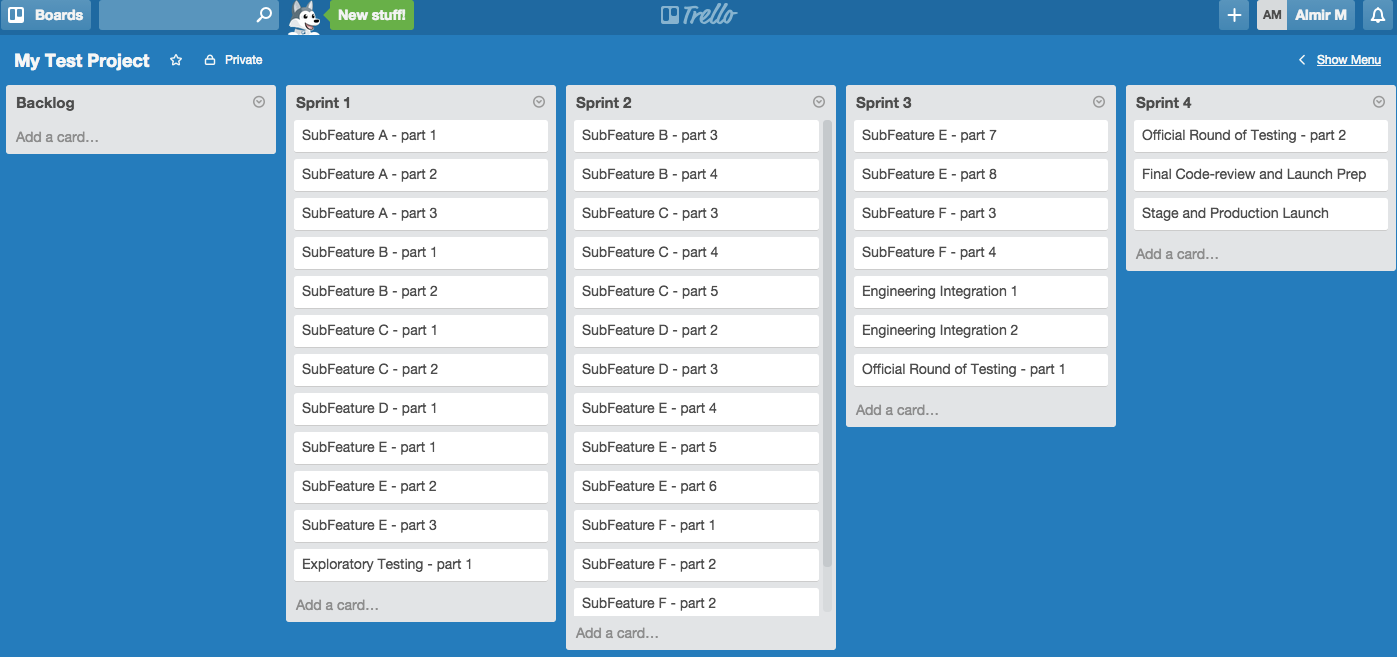


You are done. Provide your boss the duration of the project, major milestones and the production launch date that you can achieve based on these high-level estimates.
What’s next?
Well, now you need to share this with the team and help out the team do proper sprint planning at the user story level by using this sub-feature plan. I happened to use Trello just for the purposes of “sub-feature” planning, but when it comes to sprint planning at the user-story level, your team will need to use whatever tool your company approved.
Good luck and have fun.

Almir M (almirsCorner.com)
#Agile #AgileMethodology #ProjectManagement #ProjectPlanning #SoftwareEngineering #SoftwareDevelopment #Scrum #Planning #Trello #SAFe 


Thursday, June 18, 2015

Detect errors on time to gauge the success of your launch — Simple concepts, huge benefits!

When you develop your applications, do you put thought into a proper logging mechanism? In a perfect world, there should be no errors in the logs, but we all know that’s not the case in reality. Then how do you know that the project you just launched to a production environment is not introducing new errors or new types of errors on top of already existing errors that your triage team has been investigating?
Maybe on day 1 of your launch, you don’t see customer complaints, but in reality your systems are hurting or bleeding slowly. Yes, a network operations team could be checking the high-level health of the systems through a list of dashboards, but what are we software developers going to do to introduce a new level of detection? This all starts from the enterprise architecture and frameworks you build. Let’s assume you have a very robust logging mechanism and that this mechanism allows you to log the happy path. Let’s also assume that you have very clean guidelines for error and exception handling and utilizing the logging framework where necessary.
Now that you have all of the above in place, at the beginning of your project that is implementing business requirements within the existing framework, you have ability to cleanly define the top 20 cases to measure the success of the new code/features. Each developer can use this top-20 list as a guideline while developing the code and logging happy/negative cases. Let’s say your code is now in production and you are scanning through the logs manually and detecting the top-20 cases. Is this efficient? Are you supposed to do this on daily basis manually?
My recommendation is that you develop a lightweight solution that will be able to automatically do the following for you:
  • * Scan the logs on daily/hourly basis and produce the count of the top-20 scenarios and display the results in a table on some internal dashboard website
  • * Have ability to detect if the number of errors in each category increases by more than X% (daily comparison of errors per Y units of work and units of work could be somehow defined and tied to the traffic on your website).
  • * Have ability to detect if new types of errors and exceptions that start happening so that the team can manually assess the situation and then add each new type of error to the top-20 list and start tracking it on daily basis.
If you have all of this automated, then there is no manual work needed when you launch something to production. You will be able to tell if your new code is hurting the numbers on existing top-20 categories and you will also be able to tell if you started introducing new types of errors that hurt the revenue of your company. Let’s assume that your production deployment involves deploying to a smaller/secondary data center first and then later to the rest of your data centers. Then this type of mechanisms can help you decide whether you continue deploying to the rest of data centers after deploying to that smaller data center.
These are all simple concepts. You can spend minimal efforts in building it yourself or maybe decide to buy a solution. The importang thing is to always take the “keep it simple” approach in decision making.

Conclusion:

Start by tracking top-20 errors on daily/hourly basis and use the percent of change as the gauge for the success of your code being pushed to production environments. Detect the newly introduced low-level engineering errors in production on time to gauge the success of your launch. Don’t over-design this! Keep it simple!
Almir Mustafic (almirsCorner.com)

#softwareengineering   #softwaredevelopment   #code   #coding  #programming   #software   #errors   #ExceptionHandling   #NOC  #monitoring  

Tuesday, June 2, 2015

Study to pass school (aka get credentials) or Study to Learn?

After interviewing a lot of candidates for software development jobs, I am starting to remember the days when I went to school and I am wondering about the following question:

Should students study to pass college or should they study to learn?


This question comes from my concerns that I have about candidates from both great and average universities. There is no direct relation between your skills and your credentials; it is really up to individuals and how they approached studying. When I attended the University of Toronto in mid-90s, I studied Computer/Electrical engineering. This university was considered to be one of the top three universities for computer/electrical engineering program in Canada, and also among the top 10 when compared to big players in US. My parents were willing to pay for me to go to this school even though I had a full scholarship offer with another average university.
Did I make the right choice attending the better school? Are you making right choices now?
Right choices? It all depends on how I approached my studying. If I had studied to only pass and get good credentials from University of Toronto, then my parents’ money was not invested properly. I studied to learn and if that meant that it would actually affect my grade in a negative way, that’s how I approached it. This may not make sense, but we all remember the days from our college when exams had things that you would never apply in real life and in the meantime the courses were also teaching things that were very applicable in real life. If you studied to learn things for long term, then a lot of times you would get in trouble. Don’t misunderstand me here. Yes, there are things that are taught in courses for which you can’t see applications in real life in that given moment, but you need to plow through it and you will see answers to these doubts at the end.
I have also seen the opposite effects. I am talking about schools diving into real life examples too soon without teaching students good fundamentals in that area. If every student approached this, then nobody would be inventing new things; it would just be a game of putting components together. There has to be some golden balance.
Going back to interviews that I mentioned at the beginning of this article. Regardless of your school credentials, you need to have very strong fundamentals and you need to be able to apply those fundamentals at the right time. For example, software engineering is a very wide field these days and it is impossible to have expertise in all the areas. This is where the fundamental knowledge kicks in. When you jump from field to field in software engineering industry, you will not know everything but you will need to apply those fundamentals and learn quickly. That’s where you separate yourself from others.
In conclusion:
Put the credentials of your university aside and use the great things from your school to learn.
Almir (almirsCorner.com)
#school #college #university #study #credentials #tech #softwareengineering #computerscience #programming #coding

Monday, May 25, 2015

Wheel Alignment — Yes, my car needed it ! Does your car need it?

If you lower your car, make sure you do the wheel alignment. I managed to avoid this with previous cars, but the alignment on my Honda Fit got affected drastically after putting H&R Sport springs and new shocks/struts. I knew I should have done the alignment right away, but instead I learned the hard way by fully running through a pair of Bridgestone summer performance tires in just 4,000 miles.
Here is a picture of a front tire that got worn out and a rear tire that stayed perfectly fine. Since I put a few thousand of miles in a few months, I was not expecting my tires to be in this condition. Just when I was thinking about doing the tire rotation, I realized what’s going on.
So what did I learn from this? I learned that I should not try to take the cheaper route which in reality ends up more expensive ☺. Most of you don’t lower the suspension on your cars, but the alignment can still change. We all need to check the tires regularly for uneven wear and for super fast wear. For the car nerds out there, both the toe and camber were off. The toe being bad caused the tires to wear out very quickly. The camber caused the uneven tire wear.


Have fun driving and be safe.
Almir (almirsCorner.com)
#cars #suspension #wheels #wheelAlignment #HRsprings #shocks #lowered #lowering #tires #performance #summertires 

Buying a new car — Crazy Great Deal?

5,000 off of MSRP price of a new car. Yes, that’s the deal I got on a new Honda Pilot.
Here is how you can do it.
TrueCar.com
Choose the car you want and see what deal they give you. If you like the deal, print out the certificate for the dealer that is willing to honor that deal. Check the inventory of that dealer and drive there. Show them the certificate and test drive the car.
When you sit down to do the paperwork, make sure that they don’t include dealer-installed accessories unless you want them. Also, don’t negotiate on the monthly payments. Do all the paperwork on the actual price of the car. Once you sign on the price of the car with taxes. Then make sure they give you a monthly payment that matches with the total price. There are plenty of car loan calculator apps that you can get for your smartphone to help you out.
TrueCar changes the deals on hourly and daily basis. The day after I got the $5,000 deal, TrueCar lowered the deal discount to $2,200. This is kind of similar to buying airplane tickets.
For example if you are looking for a new Prius, they were having a discount of $4,900. For a new GTI, a discount of $2,500. Click here to see some deals from yesterday.
Have fun shopping if you are looking for a new car and never go to a dealer alone as you need extra pair of eyes while doing the paperwork.
Have fun driving and be safe.
Almir (almirsCorner.com)
#cars #CarPurchase #Buy #Deals #TrueCar

Sunday, May 10, 2015

Google becoming Amazon. Amazon becoming Google. Is the word “amazon” going to be become a verb?

Now that Google is introducing a “buy” button in the search results, they will be slowly cutting into the market share that Amazon.com owns. I have a prime membership with Amazon and I love it, but if Google makes things easy with a “buy” button within search results, I am not promising that I will not use it. Is Google becoming Amazon? Will Amazon need to become Google in this segment to protect this line of business.
I never really thought of Google and Amazon as director competitors, but as these companies try to figure out ways of making more money and keeping their shareholders happy, their business models are becoming very similar and the competition is heating up. As a consumer, it is interesting to stand on the side lines and use these services as most of them really make our busy lives simpler. I am a big user of Gmail, Google Drive, Google Play, Hangouts, and Amazon Prime. These products make me more productive and save me trips to local stores which in turn give me more time with my family.
The recent move by Google to get into the market of selling items through their search results might pressure Amazon to expand and become an alternative search engine to protect their business line. That would be my long-term prediction.
Am I totally off? Is the word “amazon” going to be become a verb in our daily conversations?
- almirsCorner.com - 

#tech #technology #Google #Amazon #products #ProductManagement 


Prototype — Turning it into Final Product quickly in order to see innovation in action !

I have a saying “There is nothing more final than a POC/Prototype”.
Sadly a lot of times an unpolished prototype just becomes your production version of software. 
On the other hand, we have cases where prototypes fully become a throw-away work. How do we take a prototype into a final product quickly to see the fruits of your innovations with minimal effort and at the same time not have a drastic difference between the design of a prototype and the design of the final product? In other words, how do we introduce agility and flexibility?
What’s on the table. You have the following in the picture regardless of the type of architecture:
  • Product owners and innovative ideas
  • Front-End development
  • Web-tier (server-side) development
  • Business logic development in some forms of web services or APIs.
When you develop prototypes, you can take the Business-Logic component out of the equation most of the time and for the purposes of this article, I will not focus on that part. My focus will be strictly on the Front-End development and Web-tier (server-side) development. In order to get to some recommendations, I will need to take a quick trip in the history of web development. I will mostly talk about role of Microsoft technologies in web development as go quickly go through the history.
In the old days, the web development was done via classic ASP and it was somewhat friendly for front-end developers because the control was within the front-end code (ASP files). Then Microsoft went in the direction where the control shifted towards the server-side development and the HTML code ended being a collection of .NET user controls being invoked; this took away power and creativity from front-end developers as they relied heavily on software engineers like me ☺. Then Microsoft introduced MVC via Razor syntax giving back the capabilities, flexibility and creativity to front-end developers. If you and your team made architecture guidelines to only use Razor syntax for IF conditions and FOR LOOPS without cheating and calling C# methods, then the Razor syntax (CSHTML) files were very close to HTML files. Taking aside the MVC concepts, I would say that Razor syntax in CSHTML files is very close to PHP. To some degree we could say that front-end developers could go in a dark room and implement all the plain HTML5/CSS3/Javascript code and then quickly integrate it with the MVC/Razor syntax and have the web application fully working. This could be true if you stayed away from using a lot of Html helpers in Razor, but we know that’s not the case most of the time and this requires a lot of discipline.
So what can we do to keep this integration as simple as possible?
We need to develop the prototype within the front-end code in such a way that it just plugs into the web-tier (server-side) code with almost zero impact. So the web-tier (server-side) code in a way becomes a harness for your front end code. If you think of it as a harness while designing the front-end prototype code, then it really means that you don’t need the web-tier (server-side) developed at all for the purposes of your prototype. However, you need the mocked version of this harness that returns back to the front-end code some meaningful test data.
The important thing is to define the clean interface between your HTML/Javascript code and your web-tier (server-side) code; the person coordinating this effort should be the front end developers who have the full understanding of the product and product features that need to be built. I am really talking about the JSON objects as the signatures. You really need to define what type of data should go back to the client from server and define all the JSON format. You just need to be very careful from the security point of view so that you do not reveal something in the JSON that was typically handled in the backend before and now you are sending that information back to the client giving hackers power within Javascript execution. Then you need to define what type of data needs to flow from client to the server and cleanly specify the JSON format. If you don’t pick an existing Javascript framework, then you need to define your own Javascript controller code that will contain the mechanism of passing the JSON information between HTML code and server-side code via AJAX calls or as people call it API calls these days.
Once you have all this defined, then the front-end developers can go with full speed developing the HTML and Javascript code without needing to have the web-tier (server-side) code implemented. You would just need to develop some simple version of the server-side code that would be able to receive and return some sample JSON information in order to test different permutations.
After reading all of the above, one might say “why don’t you just use NodeJS”. My answer is: My article is not about recommending the type of technology that you would use; it is about the concepts that you could apply even using your existing technologies if you don’t have the luxury of switching to a different technology. You could achieve the goals of this prototype by using NodeJS, .NET Web APIs, PHP web service, Django Python web service and many other technologies.
In conclusion, the front-end prototype code really becomes iteration #1(following the architecture of the full solution) for a potential project if the prototype or POC gets approved. The prototype does not have to be thrown away and built in another/real framework from scratch because it IS already in the real framework. It can be just continued as part of an approved project and during that project there should be no surprizes; it is just a matter of fine-tuning the front-end code and having the server-side test harness code replaced with the full functionality.
In a nutshell, this means that product owners / innovators can work closely with the front-end developers (aka product developers) and be one step ahead of the game when that project gets finally approved.
Who wins here? Product owners win. Developers win. Your company wins and the most importantly your customers win.
- almirsCorner.com - 

#Tech #Technology #innovation #disrupt #prototype #SoftwareArchitecture #programming #code #coding #HTML5 #Javascript #WebAPI #NodeJS #Django #Python #PHP #JSON #Csharp #DotNet  


Saturday, May 9, 2015

Gas Prices and Buying Cars with Stock Trading approach - kind of 

What happened to gas prices here in California? I had to fill up last night and pay over $4.00 per gallon. I used to pay around $24 for full tank and last night it was more than $35.
When gas prices were around $2.30/gallon just recently, did you buy your favorite truck or SUV that you always wanted or you ended up buying an economical car?
Here in America, cars are part of day to day life and the crucial part of our economy. We don’t buy economical cars because we want to; we buy economical cars because we need to, or because you grew up around somebody driving economical cars (like me) and it is engraved in you and your subconscious does not let you pick otherwise. Car enthusiasts in America are spread among sports/sporty Japanese cars, sports/sporty American cars, luxury cars fully loaded, foreign and American trucks, low riders, and etc. As a car enthusiast, you belong in one of these categories, but I am sure at the end of the day we would like to have one of each ☺.
Let me get back to my point. If gas prices and fuel consumption levels matter to you for economical reasons or personal beliefs, you/we need to be smart about it. When I was in Europe years ago, and friend of mine jokingly told me: “It does not matter if the gas prices go up. I always put 20 Euros in my tank and that’s it”. This is a funny statement, but it is true. Our friends in Europe put in the tank as much as they can afford and they drive as much as they can afford. Luckily, they have good public transportation. A few years ago, I asked a friend of mine here in California: Why did you buy a truck if you see that gas prices are climbing? He responded with: “I budget $300–$400 for gas per month and then I don’t feel bad about spending so much for gas”. This is true for a lot of people who can afford to budget a substantial amount and not worry about it again, but there are a lot of people who cannot afford high gas prices and they live in cities where public transportation is nowhere close to European or Japanese standards.
If you want to save money in the long term and you are in the market to purchase, you need to be patient and watch the trend of gas prices and the prices of economical cars. This is very similar to stock trading. You need to know when the prices of gas are at its bottom within last 12 months and then purchase an economical car. The prices of economical cars during the period of low gas prices is the most optimal.
I happened to buy a 2008 Honda Fit for $8,700 about 6 months ago. I was lucky. The gas prices were very low and at the same time, I was so tempted to get a Toyota FJ Cruiser because I always wanted some type of a tough truck/SUV. I’ve always owned economical cars that I would modify to my specifications and still have fun with them. As I mentioned at the beginning of this article, the gas prices are back to $4.00+ and based on a quick search, 2008 Honda Fit is being sold for $10,000 to $11,000. In theory, I could sell my car and maybe make some money on it ☺.
Conclusion:
Watch the trends of gas prices and try to live with your current car until you determine that gas prices are low enough and that economical cars are NOTon demand and about to be on demand.
This is what I mean by following the stock trading approach. We observe when economical cars lose popularity due to low gas prices and then you buy an economical car. Don’t just buy any economical car; there are plenty of choices; you can test-drive as many cars you want and determine which car will give you that good combination of fun factor (whatever that means to you) and MPGs. Have fun exploring, driving and be safe.
- almirsCorner.com -

#cars #carreview #gas #gasprices #economical #MPG #gasmileage #fuelconsumption #fueleconomy


Monday, May 4, 2015

Self-contained Scripts, Jenkins, TeamCity ...

This week's scripting advice:

When you write scripts (windows batch, Puppet, PowerShell, ...etc), try to make them as self-contained as possible. Sometimes it is easy to get caught up in the coolness factor of Jenkins, TeamCity and other tools where you start breaking things apart too much and you end up marrying yourself too much with that tool. Then the de-coupling becomes much harder when you decide to re-architect things.

As you scripting out an automation process, assume that you would be invoking this main script from command-line yourself. How would you develop it. Yes, learn the features of Jenkins and TeamCity and think about them as you are developing your scripts, but don't let those features impact the modular design of your scripts.


- almirsCorner.com -

#scripting #scripts #batch #batchscripts #PowerShell #Puppet #Jenkins #TeamCity #programming #programmer #DevOps #automation #BuildAutomation 

Sunday, May 3, 2015

Backup solution - Very Simple Example for Techies - When was the last time you backed up your personal computer?

Have you backed up important files on your personal computer?

We are all guilty of procrastinating this task and we don't see a value in this until we feel the pain of losing years of family photos one day.

Let's pick today as the day when we are going to start performing the regular backup.

There are many different solutions for backup. Some are relatively cheap and some are expensive. If you have nothing to hide and you trust the cloud enough, I strongly recommend that you back up your day to day files Google Drive or Dropbox or Microsoft OneDrive or even Amazon Cloud. Besides having a good cloud backup, it is also convenient because those files follow you from computer to computer.

This article is NOT about cloud backups. It is about you purchasing a USB device and backing up your files once a month onto your USB drive. So what is the worst case? You would lose the most one month of data if your computer crashes.

The goal is to make it as easy as possible so you don't have to copy and paste a bunch of folders and files manually. The goal is to have it scripted/automated and guess what... these scripts are free. This solution just requires a bit of computer skills that intermediate-level users of Windows operating system should be able to handle.

Let's get started ! This template script is the one that I use for my personal computer backup.

I am providing you below two Windows batch scripts that work as one application and perform the backup of your important files by just double-clicking on it. However, you will need to do some initial setup and then subsequent steps are very easy.

Setup Instructions:

If you are not comfortable doing the following steps, find a techie friend who can set this up for you in a few minutes.

  1. On C:\ drive create a folder called BackupScripts
  2. Go inside that folder and create two files invokeBackup.bat and backupScript.bat by taking the content of these from below.
  3. Create a shortcut on your desktop to invokeBackup.bat file.
  4. Open backupScript.bat file by right-clicking and pressing Edit. Then in that configuration section, edit the names of the folders that you want to back up and also the names of destination folders. You can use the examples that I provided in the sample script.
  5. Once you set up this backupScript.bat file, there is no need to open this any more in the future unless you decide to add brand new folders to the list of folders that you wish to back up.

How to Run the Script when you want to perform the backup:

I happen to put a reminder for myself to do a backup once a month. Here are the steps that you need to execute:

  1. Take your USB drive and plug it into your USB port. Make sure that its capacity is big enough to hold all the data that you are planning to back up.
  2. Look at the drive letter that was assigned to this USB drive and then open invokeBackup.bat file (by right-clicking the file and selecting Edit). In the script edit the variable USB_DRIVE_LETTER to the correct drive letter for your USB drive.
  3. Also in that script, edit the date. This date is useful as the script generates a log file of what it backed up and saves that into a file that starts with "BackupLog".
  4. Save the invokeBackup.bat file and exit out of it.
  5. Then run invokeBackup.bat script by double-clicking on it within C:\BackupScript folder or by double-clicking on the shortcut that you created earlier in the setup. When you double-click on it, it will pop-open a command-line window.
  6. If this is the first time doing it, then you go browse to your USB drive and look inside the backup folder and see if the files are being copied there. If they are, then everything is working fine.
  7. The backup is done when you see a message in that command-line window that the backup is done.

For example, I have 400-500Gb of data that I need to back up. This takes hours and the beauty of this script is that I can walk away from my computer and check the progress many hours later. I typically run this over night and check the status in the morning. If your backups are long, you need to make sure that the power options on your computer are set up so that your computer does NOT go into sleep if there is no activity (mouse movement) on the computer. I typically set the power option so that my laptop does not fall asleep while it is connected to power.

I strongly recommend that you perform the backup of your personal computer to two different USB drives and take one of your drives to a family member that you trust. 

Enjoy !!


__________________________________________________
invokeBackup.bat

@echo off

REM ****************************************************************
REM THIS IS THE CONFIGURATION THAT YOU NEED TO UPDATE **************
REM ****************************************************************
set USB_DRIVE_LETTER=E
set backupDate=2015_05_03
REM ****************************************************************


REM ****************************************************************
REM STARTING THE BACKUP ********************************************
REM ****************************************************************
set LOG_FILE=BackupLog_%backupDate%.txt
echo STARTING...
date /t
time /t

echo starting > %LOG_FILE%

REM Invoke the main script to start backing up
call backupScript.bat %USB_DRIVE_LETTER% >> %LOG_FILE%

REM Copy the log file and some finishing touches
xcopy /E /V /R /Y %LOG_FILE% C:\BackupScripts
xcopy /E /V /R /Y %LOG_FILE% %USB_DRIVE_LETTER%:\
echo DONE
date /t
time /t
echo THE BACKUP IS DONE.


REM End of script
pause

__________________________________________________

__________________________________________________
backupScript.bat

@echo off

set USB_DRIVE_LETTER=%1

mkdir USB_DRIVE_LETTER:\BACKUP

echo *********************************
echo Start backup
echo *********************************
date /t
time /t


REM *******************************************************************************************
REM THIS IS WHERE YOU CONFIGURE THE PATHS and DESTINATIONS of folders that you want to back up
REM *******************************************************************************************
set DIR01="C:\MyStuff\MyNotes"
set DIR01_DEST_A=%USB_DRIVE_LETTER%:\BACKUP\MyNotes
mkdir %DIR01_DEST_A%
xcopy /E /V /R /Y %DIR01% %DIR01_DEST_A%

set DIR02="C:\MyStuff\MyPics"
set DIR02_DEST_A=%USB_DRIVE_LETTER%:\BACKUP\MyPics
mkdir %DIR02_DEST_A%
xcopy /E /V /R /Y %DIR02% %DIR02_DEST_A%

set DIR03="C:\MyStuff\MyVideos"
set DIR03_DEST_A=%USB_DRIVE_LETTER%:\BACKUP\MyVideos
mkdir %DIR03_DEST_A%
xcopy /E /V /R /Y %DIR03% %DIR03_DEST_A%
REM ********************************************************************


date /t
time /t

echo *********************************
echo End backup
echo *********************************

REM END OF SCRIPT
___________________________________________


- almirsCorner.com -

#backup #cloudbackup #GoogleDrive #Dropbox #OneDrive #USB #USBdrive #batchscript #scripting #batchfile